
No Asteroids Controls & Controller Mapping Guide
Complete verified v1.0.2 keybinds for No Asteroids on Windows PC, Apple Silicon Mac, Xbox, PlayStation DualSense, and Steam Deck—covering surface mining, mothership controls, shop terminals, and mining combo timing.
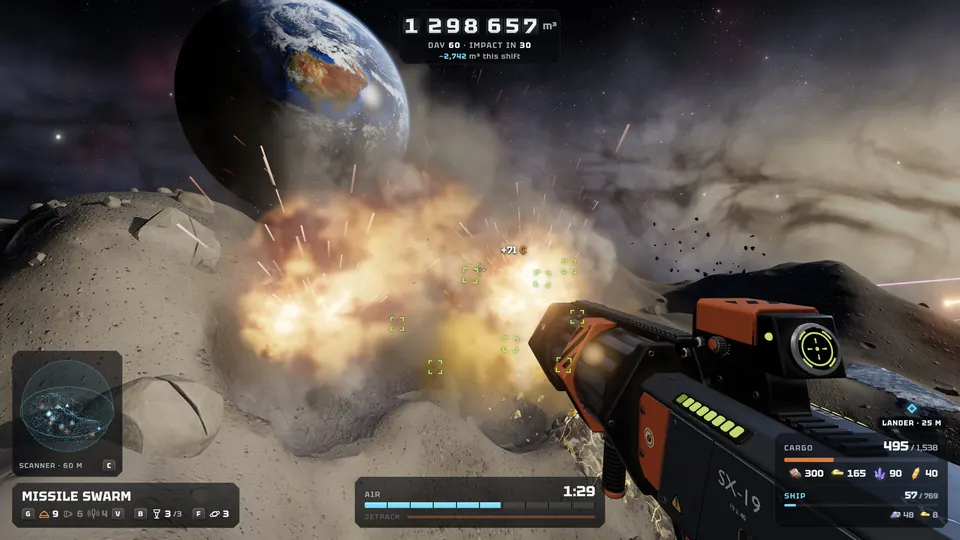
No Asteroids supports full keyboard-and-mouse rebinding (including side, right, and middle mouse buttons, numpad keys, and mouse sensitivity down to 0.05) as well as Full Controller Support for Xbox, PlayStation DualShock / DualSense, and Steam Deck gamepads.
Every binding below is verified directly against No Asteroids v1.0.2.
PC & Mac Keyboard and Mouse Controls
You can rebind any key below from Settings → Controls without restarting your shift.
| Action | Default Key / Button | Notes |
|---|---|---|
| Move Forward / Back / Left / Right | W / S / A / D |
Automatic ducking under low ceilings |
| Jump / Activate Jetpack | Space |
Hold or tap mid-air to thrust (works while looking down) |
| Sprint | Left Shift |
Boosted by Boots upgrade (+4%/lvl, +2%/lvl Hard Way) |
| Mine / Fire Tool | Left Mouse |
Hold for continuous Drill, Laser, Plasma cutter, or Lance |
| Secondary Fire / Throw | Right Mouse |
Toggles Missile swarm spread vs. Tunnel Mode & Lance charged vs. continuous fire |
| Interact / Use Terminal | E |
Enter lander, open shop, drink coffee, pick up artifacts |
| Secondary Action | F |
Context-sensitive secondary interaction |
| Mineral Scanner & Ore Glow | C |
Pings nearby minerals (and museum rooms at Scanner Lv 6); customize colors in v1.0.2 |
| Throw Charge | G |
Throws the currently selected workshop charge |
| Choose / Cycle Charge | V |
Cycles between Explosive, Shaped, Shaker, and Singularity charges |
| Place Mining Rig | B |
Deploys an autonomous Mining rig during your shift |
| Place Beacon | Z |
Drops a directional return beacon in deep tunnels |
| Tether to Lander | R |
Reels you back toward the lander (upgradable to infinite range at Lv 4) |
| Searchlight / Headlamp | L |
Toggles suit lighting (upgradable up to 90 m reach) |
| Next Tape (Headphones) | M |
Switches music track once Headphones ($1,000) are unlocked |
| Push to Talk (Voice) | Q |
Online co-op voice chat |
| Crew Text Chat / Reply | T |
Opens co-op text chat (added in launch hotfix) |
| Find Crewmates | Middle Mouse |
Highlights teammates through rock in 1–8 player co-op |
Controller Mapping: Surface Mining Shift (Xbox / PlayStation / Steam Deck)
Gamepads automatically switch button layouts depending on whether you are mining on the asteroid, walking aboard the mothership, browsing terminals, playing arcade games, or sitting in a dome/pilot seat.
| Xbox / Steam Deck | PlayStation (DualShock / DualSense) | Surface Shift Action |
|---|---|---|
| RT | R2 | Mine / Fire equipped tool |
| A | Cross (×) | Jump / Jetpack |
| L3 (Click Left Stick) | L3 | Sprint |
| X | Square (□) | Interact / Pick up artifact / Board lander |
| Y | Triangle (△) | Secondary action |
| LT | L2 | Mineral scanner ping & Ore glow (C) |
| LB | L1 | Choose / cycle charge type (V) |
| RB | R1 | Throw selected charge (G) |
| B | Circle (○) | Tether back to lander (R) |
| D-Pad Up | D-Pad Up | Toggle Searchlight / Headlamp (L) |
| D-Pad Down | D-Pad Down | Deploy Mining rig (B) |
| D-Pad Left / Right | D-Pad Left / Right | Previous / Next handheld tool |
| R3 (Click Right Stick) | R3 | Next tape (M) |
| View | Create / Share | Toggle HUD / Find crewmates |
| Menu | Options | Pause menu |
Controller Mapping: Mothership, Terminals, Arcade & Seats
| Button (Xbox / PS) | Aboard Mothership | Shop & Computer Screens | Canteen Arcade | Pilot & Telescope Seats |
|---|---|---|---|---|
| A / Cross | Jump | Confirm (Enter) |
Jump / Action (Space) |
Confirm (Enter) |
| B / Circle | Back / Cancel | Back / Close (Esc) |
Back / Exit (Esc) |
Exit Seat (Esc) |
| X / Square | Interact (E) |
Interact (E) |
Start / Confirm (Enter) |
Interact (E) |
| Y / Triangle | Secondary (F) |
Secondary (F) |
Pause Mini-Game (P) |
— |
| RT / R2 | Use / Wash / Clean | Click / Select | Primary Action | — |
| LT / L2 | Throw / Secondary | Action (G) |
— | — |
| LB / L1 | Crew Chat (T) |
Previous Tab (Shift+Tab) |
— | — |
| RB / R1 | Reset / Tether (R) |
Next Tab (Tab) |
— | — |
| D-Pad Up / Down | Scroll / Zoom | Navigate Up / Down | Move Up / Down | Zoom In / Out |
| D-Pad Left / Right | Navigate Left / Right | Navigate Left / Right | Move Left / Right | Cycle Earth Targets |
| L3 / R3 | Sprint / Scanner (C) |
— | — | — |
| View / Share | Status / Tab | Help (H) |
— | — |
Mining Combo Timing & Quality-of-Life Settings
- Exact Mining Combo Window (
×1.5Max): Every consecutive mining hit within1.5 secondsof the previous hit adds+2.5%, stacking up to 20 hits (×1.5max multiplier)—which also unlocks the On a roll Steam achievement. Continuous tools like Drill, Laser, and Plasma cutter maintain 20 stacks effortlessly. - Skip Flight Cutscenes (Update 1.0.2): Open Settings and toggle Flight cutscenes off to skip lander drop and return animations between shifts.
- HUD & Mouse Fixes: You can hide the ore health bar below your crosshair, select an explicit screen resolution, customize per-mineral scanner colors, and recover mouse-look cleanly after alt-tabbing on Windows.
- Tether Safety Habit: Keep your finger near
R(or B / Circle on controller) whenever digging deep shafts—triggering your tether at 12–15 seconds of remaining air prevents accidental blackouts and protects your personal backpack cargo.
Want to check which tools or charges pair best with these bindings? Read our No Asteroids Tools, Drones & Ship Weapons Guide or test breakpoints in the No Asteroids Calculator.
No Asteroids Controls FAQ
Can you rebind keys and mouse buttons in No Asteroids?
Yes. No Asteroids supports full keyboard and mouse rebinding in Settings (including right, middle, and side mouse buttons plus numpad keys), as well as fine mouse sensitivity adjustments down to 0.05.
How do you switch fire modes on the Missile Swarm and Lance?
Press Right-Click on PC/Mac to toggle the Missile swarm between spread fire and focused Tunnel Mode, or to switch the Lance between charged shots and continuous fire (added in Update 1.0.2).
What are the co-op chat and find-teammates buttons in No Asteroids?
Press T for co-op text chat, Q for push-to-talk voice chat, and Middle Mouse Button (or View/Share on controller) to highlight teammates through rock with Find Your Crew.
Does No Asteroids support Xbox, DualSense, and Steam Deck controllers?
Yes. No Asteroids includes Full Controller Support on Steam for Xbox, PlayStation DualShock/DualSense, and Steam Deck controllers, with automatic context switching between surface shifts, the mothership, terminals, arcade mini-games, and seats.
How do you skip lander flight cutscenes in No Asteroids?
Open Settings and turn off the Flight cutscenes option (added in Update 1.0.2) to automatically skip lander launch and return flight animations.